CC User Installation / Configuration Instructions (Version 3.00)
DX Cluster Client Program
- Initial installation instructions are towards the
bottom.
- Full featured Telnet and TNC program for use with CC
Cluster , AR
Cluster , DX
Spider , CLX, DxNet, or WinCluster
Nodes.
- 32 Bit Windows Program that allows "point and
click" setting of node parameters. Runs under WinXP/2000
and later versions of Windows.
- Has Telnet, DDE, and RS-232 outputs for logging and
contest programs. Unlimited number of telnet connections.
- Can insert States and Provinces into feed to contest
programs to aid in multiplier determination.
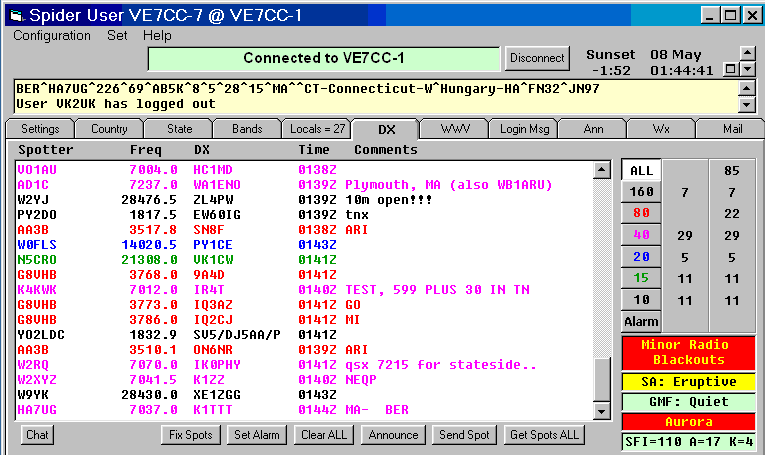
- Separates data from the cluster. DX spots, WWV,
Announces, Mail, filtering etc all have their
own tabs on the display.
- For DX Spots, each band has its own color.
- Removes bad DX Spots. (blank or duplicate)
- Can be set to reject DX spots by spotter, DX call or by
comments.
- Displays bearing and distance to DX.
- As well as the usual data in a dx spot, the following
data can also be shown. Spotter's node, Spotters country, DX Country's
regular prefix, DX Country name, spotter and DX stations CQ/ITU zones,
grid squares, states/provinces.
- LoTW & eQSL. Flags DX callsigns if the DX station uses LoTW(+),
eQSL(-)
or both(=).
- Full WWV data displayed on DX Spot page.
- Hypertext links can be clicked.
- Auto reconnects and gets missed spots.
- QRZ.com page displayed by clicking on DX or spotter
callsign.
- "Talk" messages can be sent to multiple users
at the same time. Allows a chat group using the "talk" command.
- For TNCs, receives spots in both connected and
unconnected modes and broadcast UI Frames.
- Fix
Spots
- DX
Alarms Audible, visual or even email alerts for needed countries or
states.
- For DX Spider Chat
- Saves DX Spots to log file for later analysis or
reloading to program.

Click to join the CC User Discussion Group
Notification
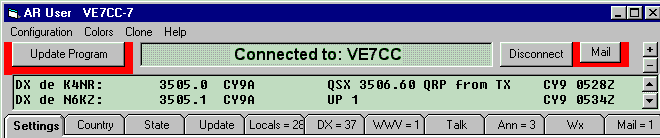
- Informs you if an updated version of this program is
available.
- Lets you know if there is a
mail message waiting for you.
- Informs you how many DX spots etc. there are that you
haven't looked at.
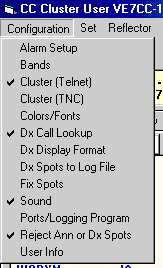
Configuration
Menu
|
|
|
DX
Display Format
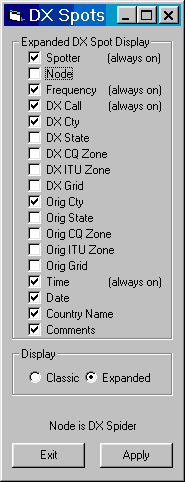
Expanded Format
- New screen layout.
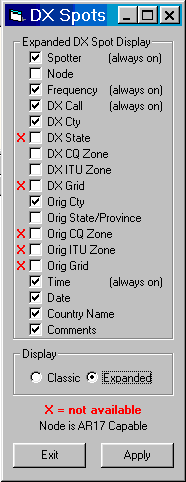
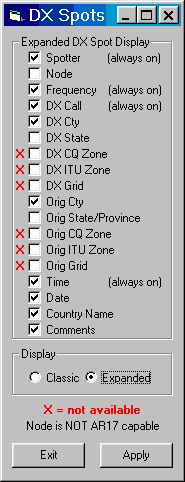
- More information is available. (Node of spotter, CQ or
ITU Zones, Country names)
- Long "comments" now do not overrun the DX QTH
field.

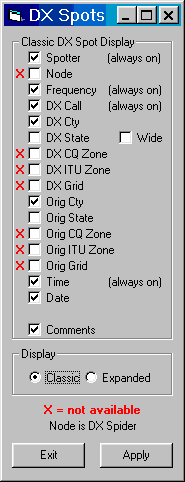
Classic Format
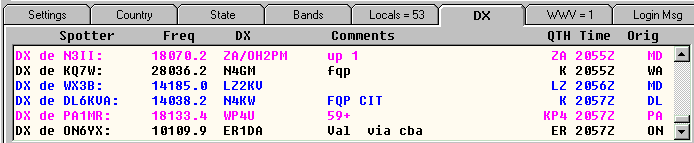
Select Format
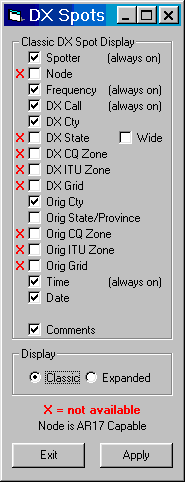
Which DX Display columns are active is determined by cluster type and if AR Cluster, whether the sysop has enabled AR17 data.
|
AR Cluster |
AR Cluster |
AR Cluster |
Spider Cluster |
Spider Cluster |
|
AR17
Disabled |
||||
|
|
|
|
|
|
Bands
|
|
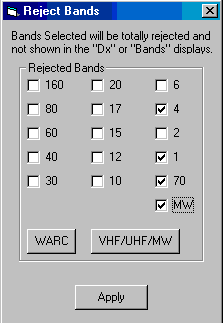
Use "Configuration>Bands" to select the bands you don't want to see. They will be completely gone! |
Telnet
Clusters
|
|
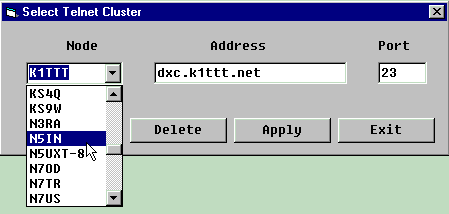
Thanks to Jim AD1C we have a list of all available telnet clusters. |
Colors
|
|
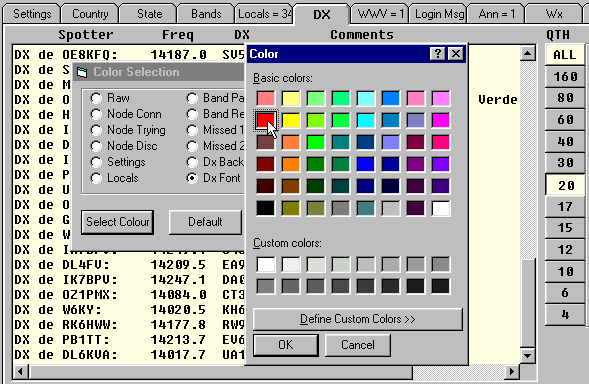
This example shows how to change the font color of 20 meters to red. Step through the following items.
|
Ports
|
|
Set for Telnet connection to node. To use a TNC see TNC Setup Information Set to allow both a Logging Program via local telnet and a Contest Program on comm 1 @ 9600 baud Can be used as a "front end" for various logging programs. Pre-filters spots. Will auto reconnect to the node if the connection drops. |
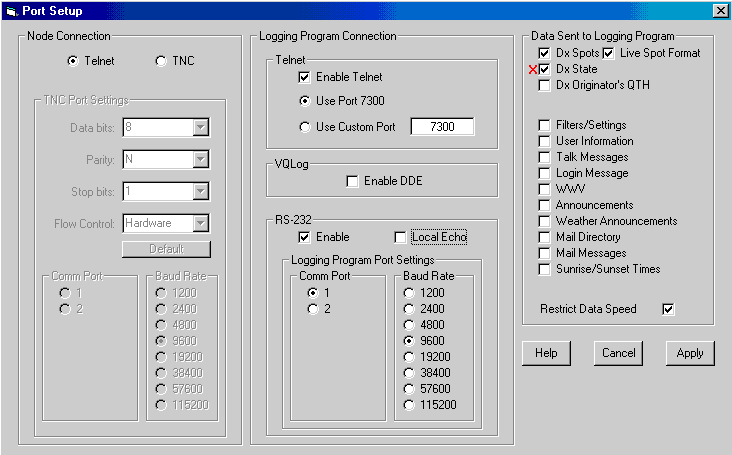
With the setup shown, the program is waiting for incoming connections from logging programs on port 7300. If the logging program is running in the same machine, use the local telnet loopback port (127.0.0.1 :7300). If the logging program is in a different machine, telnet to this machines IP address at port 7300. The number of logging program connections is unlimited. To enable or disable this feature, you need to go to "Configuration>Ports/Logging Program>Logging Program Connection>Telnet".
Reject Spots
|
|
You can reject DX Spots by "DX" or "Spotter" Callsign, or by items in the "Comment" field. In the example shown, any DX Spot with "RTTY" in the comment field will be rejected. Announcements will also be rejected for "Spotter" callsigns. |

Set
Menu
|
|
Not only can you reconnect if you get dropped, but you can also automatically pull in all the DX spots you missed. |

Enable
Linking
Allows a "Secondary" Cluster connection to supply DX spots to the "Primary" instance of the program.
- Allows logging/contest program to receive uninterrupted
flow of spots.
- Allows you to receive DX spots while your favorite
cluster is down.
- Keeps trying to connect to your favorite cluster.
- Allows different filtering for the two connections.
i.e. - Select 6 meter spots originated locally
and LF spots originated world wide.
How to use
- Start first instance of program.
- Check "Set>Enable Linking"
- Connect to any Cluster.
- Start second instance of program.
- Check "Set>Enable Linking"
- Select "Secondary" Cluster. This cluster can
be any CC Cluster or an AR Cluster that has AR17 enabled.
- Change the SSID of your call by
"Configuration>User Info>Callsign". If you chose an SSID
of 16 or higher, it will treat this new call as a completely different
user. This even allows 2 connections to the same cluster with different
filtering setups.
- Connect to "Secondary" Cluster.
- DX spots from both clusters will show on the primary
display. The secondary spots will show the secondary cluster's callsign
enclosed in brackets at the end of the spot.
Tab 1 - Settings
|
|
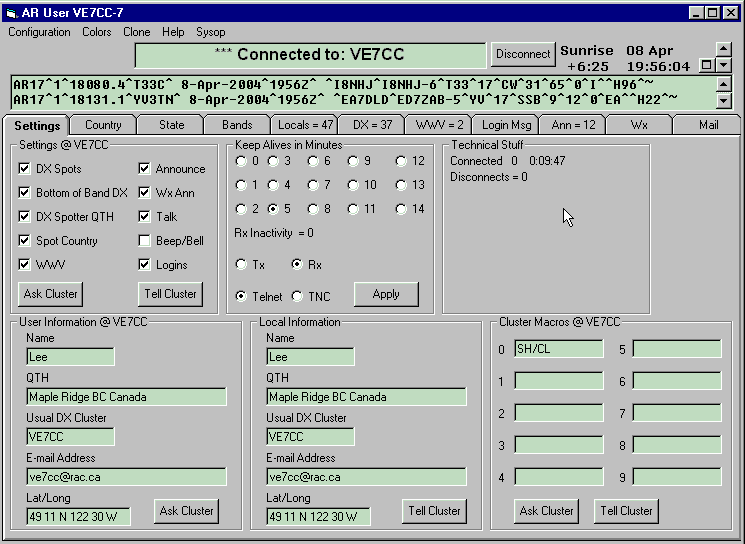
In this example the input ("raw") window shows 2 lines. To change the size of this window, click on the "up" or "down" arrows just above this window's scroll bar. To maximize the raw window, click on the "square" to the left of these buttons. |
Tab 2 - Country
Overview of Filtering
DX Cluster's can be set to filter the DX Spots sent to each user. Using this filtering, each user can customize what they see.
Filtering is done by the DX Cluster. You must press
"Tell Cluster" for it to work!
To read your current settings
- Select
"Filter Type"
- Press
"Ask Cluster"
To change your settings
- Select
"Filter Type"
- Select
"Pass" or "Reject"
- Go
through each of the 6 continents and select countries.
- Press
"Tell Cluster" to update ALL 6
continents.
Note: - Continents are shown separately for display purposes
only. For each filter type, you cannot set countries in one continent to pass
and in another continent to reject. They all must be the same.
Country Filter - NA (North America)
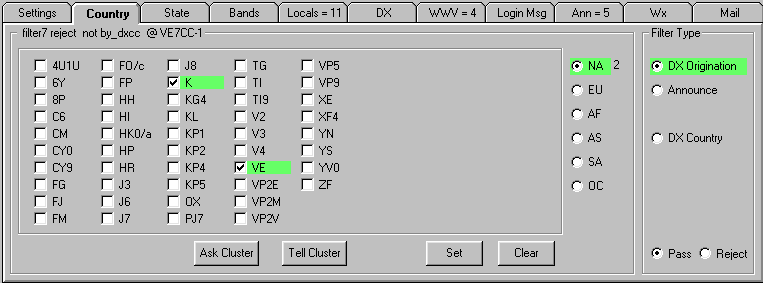
In this example, if you press "Tell Cluster", you will set DX Country of origination to pass "K" and "VE".
The numbers on the tabs refer to items that have not yet been viewed. There are 4 new WWV spots, 5 Announcements and 11 local users connected.
WAE Contest Special
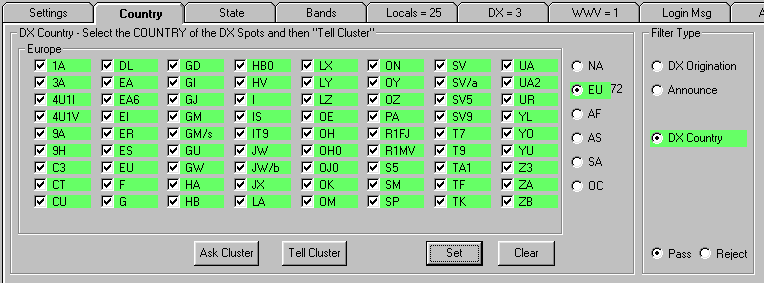
Now you are set to receive DX spots only for European stations. Just setup the bands and you are ready to go.
Tab 3 - State
State (& Province) Filter
|
CC Cluster |
AR Cluster |
DX Spider |
CC Cluster |
||
|
|
|
|
|
|
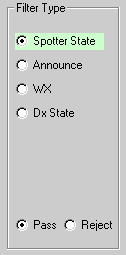
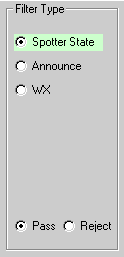
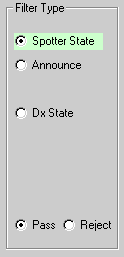

There are some differences between the various clusters. CC Cluster has the most complete filtering. AR Cluster does not have filtering of the spotted state. DX Spider does not show weather.
<="" a="">Only CC Cluster can have different filters for each band.
Feature
Availability
The features described above may not be available on your local cluster. It depends on how your local sysop has configured his system and if the latest updates have been installed.
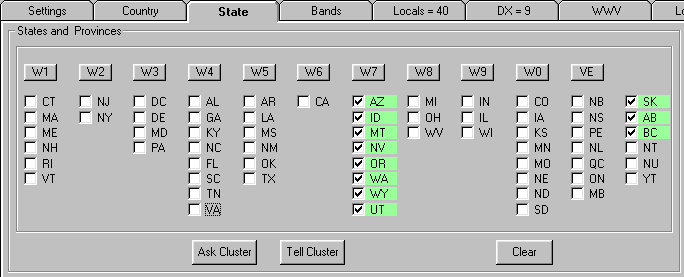
In this example, if you press "Tell Cluster", you will set States of origination to pass "AZ, ID, MT, NV, OR, WA, WY, UT, SK, AB, BC".
You MUST set the
countries of "K" and/or "VE" to PASS before selecting
states and/or provinces!
Tab 4 - Bands
DxBM
Filter Replacement
|
|
This replaces the "DX Band Mode" filter settings. The DXBM filter uses FREQUENCY to determine mode. When the DXBM is set to "pass" 40-CW, it really is set to pass the frequencies of 7000-7040. CW on 7050 is REJECTED. RTTY or SSB on 7035 is accepted. This filter shows you exactly what frequencies are used when you are setting reject or pass bands. The frequencies given are the default of AR Cluster. These are what are used by the VE7CC node. Other node sysops may have changed these default values. If in doubt, contact the sysop for the frequencies used by his node. These frequencies ranges are fixed and cannot be changed by users. |

Get Missed Spots - AR Cluster Only (Not Needed for CC
Cluster or DX Spider)
|
|
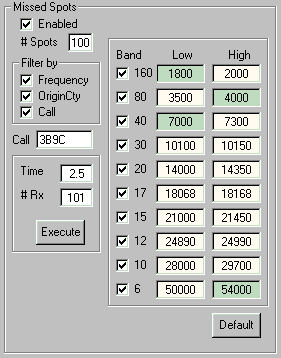
AR Cluster needs an additional setup. The following refers to AR Cluster only. A "SH/DX/100" will give you the last 100 spots. Unfortunately it gives you spots for ANY frequency. The "Missed Spots" filter tells the cluster what frequencies you want to see. You can edit these frequency ranges to get only the ones you want. Unfortunately when you specify frequencies, you will get spots from ALL spotters unless you also specify countries. If you select "Origin Cty", you will restrict the spots to the countries in your Origin Cty filter. If you select "Call", you will only see spots for the call selected. These filter settings are used when you first connect to the node if you have "Enabled" checked or when you press "Get Spots ALL" in the DX display tab. There is a limitation on the length of this command. If it is too long, an error will be generated by the node. To get around this, if possible, two or more bands are combined into one. For instance if you are passing 1800-2000 and 3500-4000, then these will be sent to the node as one group (1800-4000). If you change the 2000 to 1995, then it will be sent to the node in two groups (1800-1995 and 3500-4000). |
Tab
5 - Locals
Users per Port
|
|
The first 3 columns are 3 AGW radio ports, then telnet users, and finally node connections. You will see this display if using DX Spider or if ARC and you have "Sysop" privileges. Otherwise, you see the display directly below. |

Classic
|
|
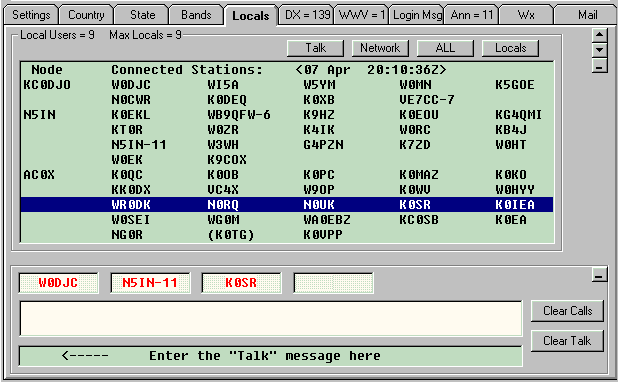
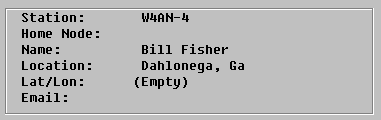
Click on any call and see "User Information". Shift + click on any call and you will go to www.qrz.com for their info. Ctrl + click on any VE call and you will go to www.rac.ca for their info. Alt + click on any call and it will be entered as the destination of a talk message. Better than "conference mode". You can enter several calls. The same talk message goes to all of them. In the example shown, W0DJC, N5IN-11, and K0SR will all receive the same message. Use the "up" and "down" arrows located in the top right corner to resize the talk window. |
Command Buttons
- Talk - Opens the "Talk" area.
- Network - Shows configuration of the system, including
passive nodes.
- ALL - Shows all the nodes and users.
- Locals - Shows local users. Usually just the local
node, but can include several nodes as shown.
User Information
Tab 6 - Dx
DX Spots
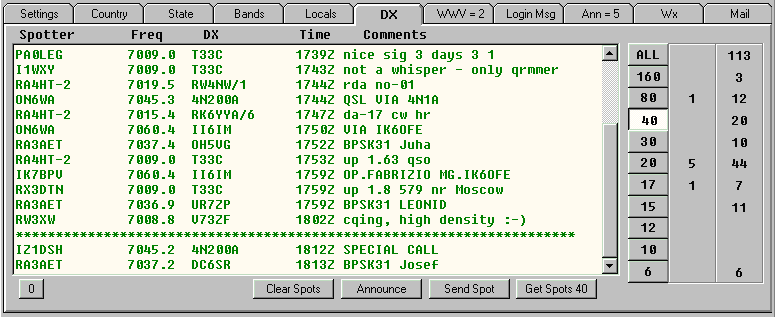
Spots are separated by band. The first column of numbers to the right of the bands are the number of spots that have not yet been viewed. The second column of numbers is the total number of spots per band. The 2 spots on 40 meters, below the line of "stars" are spots that are being viewed for the first time.
Tab 7 - WWV
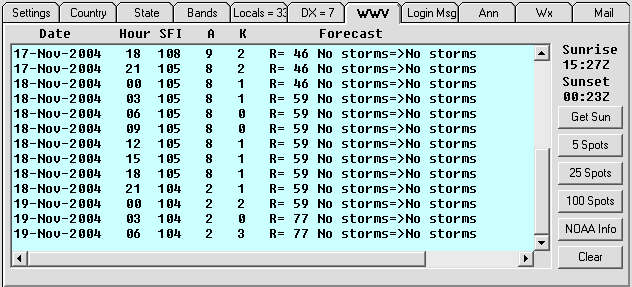
Tab 8 - Login Msg
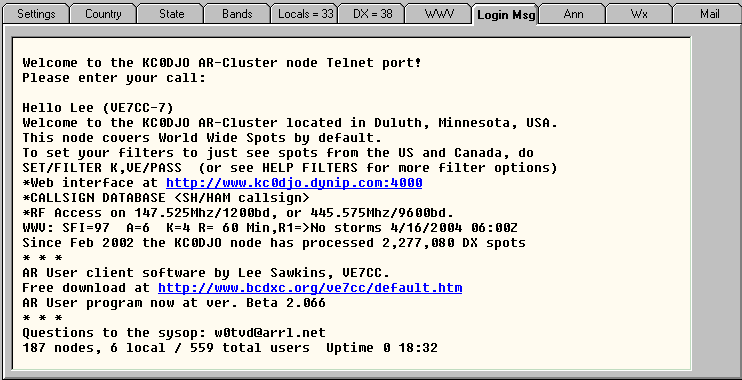
Hypertext links are clickable.
Tab 9 - Ann
Announce
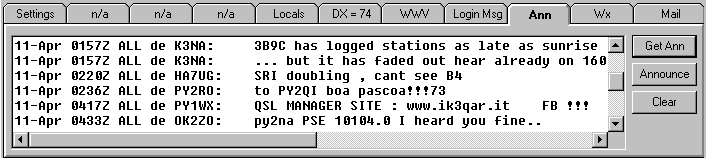
Hypertext links are clickable.
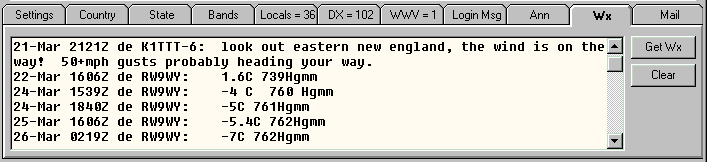
Tab 10 - Wx
Weather
Tab 11 - Mail
Directory
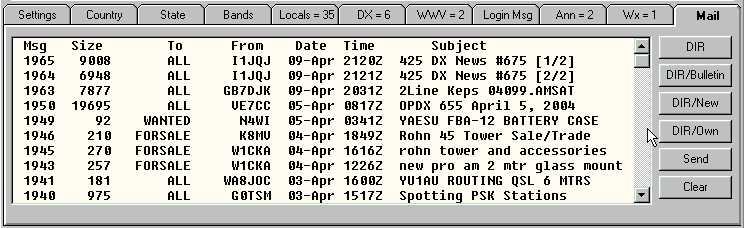
Clicking on a mail message will bring it up in a window like the one below.
Mail Receive
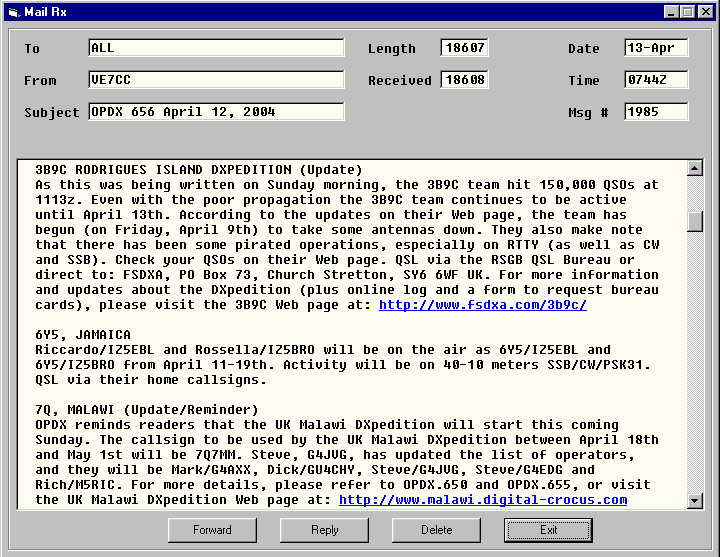
Hypertext links are clickable.
Test the Software

Which node should you connect to? Which nodes are faster? Are you missing DX by connecting to a certain node? Does the "Get Missed Spots" really work? If you want the answers, you might want to do these tests.
Start up CC User. Make sure you do not have "Configuration>Ports>Local Network>Telnet" enabled. Connect to a node of your choice. Start up another copy of CC User. Connect to another node of your choice but first change the SSID of your call in "Configuration>Local Info>" if the nodes can "see" each other. Make sure the filters are set identically. You probably want to turn them completely off for this test. You can start up as many copies as you want. Now overlap the windows as shown and watch the spots. If they are different you will soon see. Some nodes have only USA/VE or NA West Coast spots available, but the majority of them have world wide spots available. Note the relative times of arrival of the spots.
Now an additional test. Make sure you have "Configuration>Get Missed Spots" checked for all the connections. Disconnect any link, either by sending a "b" on the bottom line, or by pressing the "Disconnect" button at the top of the screen. If you have "Configuration>Auto Reconnect" checked, the ones disconnected by sending a "b" will reconnect in a minute or so. If you don't have the auto reconnect enabled you will have to manually connect by pressing the "Connect" button at the top of the screen. Now see if you really get the missed spots.
Now another test. Click the "Update" tab. Make sure you have "Keep Alives in Minutes" set to anything other than 0, which will disable them. I would suggest a setting of 5 minutes and "Rx". Press apply and go back to the DX display. Now unplug the Internet connection and go away for a while. Come back and plug it back in. If everything is working, you should get all the additional spots that went out while you were unplugged. (well the last 100 anyway)
Hopefully these tests will answer your questions, and help you to decide what to do.
What did I find out? In all the testing I have done, all the nodes have all the spots. All the spots arrive within a second or two most of the time. Occasionally one will take slightly longer. Which node is first with the spot varies from spot to spot. Which node is last varies from spot to spot. Two spots arriving at almost the same time may arrive in different order from different nodes.
The displays shown are using the new AR17 format with different bands set to different colors.
Installation
of CC User
Read Me First
Install
- Download
CC User Full Version (ver 2.421)
- Unzip
- Run "setup.exe" Do not install the
program in the default directory of "C:\Program
Files.." Install in C:\Ve7cc
- Create a shortcut to "ve7cc.exe"
- Click the shortcut
- Press the "Connect" button at the top center
of the screen.
Manual Update
If you cannot update by clicking the "Update Program" button, use the following manual method.
- Download
CC User Update (ver 2.441x)
- YOU MUST GET A FULL VERSION 2.xxx BEFORE downloading
this update (2 MB)
- YOU MUST THEN INSTALL THE FULL VERSION by running its
setup program
- Download and overwrite the ve7cc.exe file with this
one.
Revision History
for Version 3
- 3.000 Beta Release
Revision History
for Version 2
- 2.448 Changes Help Menu to include info about Version
3.
- 2.441 For HRD 5 users, quits converting sh/dx to sh/mydx.
- 2.440 Fixes problem where some users were not being
asked to update the cty.dat file.
- 2.439 Fixes problem that prevented connections to local
skimmers.
- 2.433 Fixes bug for DXSpider
where NH8S shows as KH8 instead of KH8/S.
- 2.432 Fixes problem with bearing/distance when using non CC Cluster node.
- 2.421 Fixes problem when listing local users. Adds a 5 minute timer for DX Alarm sounds.
Configuration>Sounds and check the "Every 5 Mins" box.
- 2.420 Fixes problem with URL for VE7CC
- 2.410 Changes heading and distance calculations for DX
spots when used with CC Clusters. HRD spots can now have Skimmer dupes
removed.
- 2.405 Fixes problem with corrupted eQSL
files. If you use eQSL list, you MUST update.
- 2.404 Fixes problem with auto update that causes a loop
if the LoTW or eQSL
update fails.
- 2.403 Fixes problem with the "Exit" button in
the Alarm setup page.
- 2.402 Fixes QRZ problem. Changes email for alarms. Adds
default of auto updates for LoTW and eQSL.
- 2.401 Adds feature to "automatically" update LoTW and/or eQSL user lists.
"Set" and "Auto Update LoTW"
or "Auto Update eQSL"
- 2.400 Prompts user to upload new country file which
includes ST0.
- 2.399 Removes "flicker" fix.
- 2.398 Fixes "flicker" problem when updating
Dx Tab.
- 2.397 Fixes "Reject All Except LoTW"
bug.
- 2.396 Fixes a lockup bug that may occur if you are
using skimmer spots and change the "skimmer" or "DX"
checks.
- 2.395 Fixes LoTW update
problem. Fixes alarm problem. Alarms may need to be redone!!!
- 2.394 Skimmer update
- 2.393 When Skimmer spots are enabled, allows viewing of
Skimmer and/or normal DX spots.
- 2.392 Fix for changed WCY format.
- 2.391 Bug fix for crash when adding a telnet cluster to
the list.
- 2.390 Bug fix for 2.387x
- 2.389 Bug fix for 2.387x
- 2.388 Bug fix for 2.387x
- 2.387 Several bug fixes and additional features.
- New Feature. Adds a
dupe filter for skimmer spots. It is ON by default. To turn off this
filter, put a check at "Set>Show Skimmer Dupes". Then
"Tell Cluster".
- Fixes a bug when
deleting the last item in Alarm Set-up. It was not being saved.
- Fixes a problem with
ZS8 in the country selection. It was "missing".
- Change to the log file
for DX spots. This file is now more easily imported into a spreadsheet.
Now comma separated items with no quotation marks around each line.
- Change to LoTW and eQSL menus. Please
check yours as your selections may have changed.
- 2.386 Fixes problems with eQSL.txt formatting which
causes errors in matching calls to eQSL users.
- 2.385 Fixes a bug in the eQSL
update routine.
- 2.384 Prompts user to download latest country file
which includes PJ4 and PJ5.
- 2.383 Improves login speed.
- 2.382 Improves login speed.
- 2.381 Adds Skimmer to Selection Menu.
- 2.380 Allows selection of font for Ann, WWV, WX, Login,
and Mail Tabs. Go to "Configuration>Colors/Fonts". Adds
"IP Address" to list of items that can be displayed in the DX
Tab.
- 2.379 Allows saving of spotter IP addresses for later
analysis. On DX tab, at the bottom, click "Log" and follow the
setup instructions.
- 2.378 Prevents loss of all data in the user
configuration file which may happen when updating the program. Due
to a bug introduced in the last revision you may have trouble installing
updates. If you do, please install updates by going to "Settings>Updater"
and press "Test". Then follow the update instructions.
- 2.377 Allows connection to Skimmer. Fixes a problem
where "bye" or "quit" from logging program was causing
a disconnect between the user program and the DX Cluster.
- 2.376 Allows rejection of all dx spots except those for
LoTW and eQSL users.
Select "Set>Reject All Except LoTW + eQSL"
- 2.375 Fixes password bug added in last revision.
- 2.374 Fixes the problem where some users could not save
settings.
- 2.373 Fixes bug when using DX Spider and requiring a
password. Bug introduced in last revision.
- 2.372 Adds a "keyword" filter for comments.
Fixes filtering bug when using ARC nodes.
- 2.371 Change for HRD 5 Logger compatibility.
- 2.370
- Adds information box
for LoTW and eQSL
symbols.
- Adds compatibility for
HRD ver 5 logbook connection. Only works with
clusters that have "CC11" packets. (Spider and CC Clusters)
- Fix to prevent losing
of data in .cfg file.
- 2.369 Fixes LoTW bug.
- 2.368
- Fixes some glitches
with the eQSL/LoTW
flagging.
- The DX tab buttons at
the bottom of the screen have been decreased in width and/or relabeled.
- Menu selections have
been reordered and separator bars added.
- Fixes
"runaway" problem.
- 2.367 Adds eQSL flagging of
DX spots. To enable it, click on "Set>Show eQSL".
- 2.366
- Greyline map on WWV tab
displays correctly the first time.
- Adds
"mouse-over" information on DX tab.
- Stops
"DX_ARPC" command when using CC Clusters.
- Does not disconnect
after 60 seconds if no login message received. Some busy clusters require
a longer time delay.
- 2.365 Gives sunrise and sunset times for DX Spots or
Spotter. Go to DX Tab. Hold "CTRL" key and click on callsign.
- 2.364
- Fixes the problem that
occurs when setting "Time Filter per Band" after changing the
"Configure>Bands".
- Fixes the Canadian RAC
callsign lookup.
- Allows the K3 to use
ports other than 1 to read/send frequencies.
- Re-enables "Get
WX" button.
- Fixes bug where the
complete Wx page occasionally shows as
hypertext link.
- 2.363 Adds interface for Elecraft K3.
- 2.362 Requires .cty file with
YU8 (WAE) country.
- 2.361
- For CC Clusters only,
adds two new user buttons. These turn off or on beacon and self spots. These buttons are located on the
"Settings Tab" between "Ask Cluster" and "Tell
Cluster".
- Fixes a problem with
"FS" stations showing as "FJ".
- Fixes a problem when
updating the dx cluster list.
- 2.360 Adds "FS" to the country list. Adds
"node type" to the telnet selection form.
- 2.359 Fixes a problem where WWV data was not being sent
on to a connected logging program.
- 2.358 Disables the node update form unless
"Configuration>Cluster(telnet)" is selected.
- 2.357 Adds country name to Alarm Setup form. The
country name is displayed for entries beginning with "*", which
is means spots for anyone in the country specified by the standard country
prefix which follows the "*".
- 2.356 Added alphabetical sorting to alarm list. Added
selection of invalid/unknown countries in "Reject Ann or DX
Spots"
- 2.355 Fixes truncated microwave spots.
- 2.354 Fixes problem where the wrong band was being
selected on the DX tab.
- 2.353 Added a refresh button the the
html page on the Wx Plus tab. Fixed problem with
adding new nodes to cluster.dat list.
- 2.352 Deletes Internet cache of files before updating
them.
- 2.351 Adds update form for Telnet DX Clusters.
- 2.350 Allows selection of "default browser"
for Internet Callsign Lookups. "Configuration>DX Call
Lookup".
- 2.349 Adds E7 to the list of countries required by the
cty.dat file.
- 2.348 Internationalization problem for "sh/dx" when using Spider clusters with new
software and running a non English
OS.
- 2.347 Fixes a problem where a sh/dx
xxx, where nothing is found causes the output to a logging program to
hang.
- 2.346 Further fix for problem where dx spots sent to
logging program were formatted incorrectly.
- 2.345 Fixes a problem where dx spots sent to logging
program were formatted incorrectly.
- 2.344 Added an "Ignore Bye" check box to the
"Configure>Ports/Logging Program" selections. This stops connected programs from terminating the CC
User to Cluster link when they are terminated.
- 2.343 Added a "Line Width" box to the
"Configuration>DX Display Format>" -Classic selection.
- 2.232
- Added a "DX Tab
Format for Live Spots" check box to
"Configuration>Ports/Logging Program".
- Changed the 4 meter band frequency limits.
- 2.341 Fixes a problem where the CC protocol is not
asked to be turned on for the very latest version of DX Spider software
which was just released.
- 2.339 Checks for a country list including
"4O". If not, askes user to update country list.
- 2.337 Enhancements to Internet menu on Wx Plus Tab.
- 2.336 Adds Internet access on Wx
Plus Tab.
- 2.335 "Clear Sound" button added to the DX
Tab for clearing the sound queue. When sorting dx by "Freq" it
will now allow multiple calls per band for ones that have a frequency
separation of > 9 KHz.
- 2.334
- Program no longer
checks comports unless you open "Configuration>Ports/Logging
Program".
- Changes the login
message for logging programs that connect directly to the CC User
program.
- LoTW list can now be
updated more than once without requiring the program to be restarted.
- 2.233 Time filtering per band added.
- 2.332 Fixes a bug in the LoTW
lookup.
- 2.331 Changes the lower limit of 80
meter SSB to 3600.
- 2.330 Fixes a problem with the "who" command.
- 2.329 Send DX Box now has a test spot check box.
- 2.328 Fixes a bug in the WWV display.
- 2.327 Allows the telnet interface port for logging
programs to be selected.
- 2.326 Changed the way the DNS lookup is done before a
connection is made to a cluster.
- 2.325 Improved handling of invalid frequency entries
when attempting to enter dx spots.
- 2.324 Fixes corruption of data from secondary instance.
- 2.323 Fixes problem where Spider clusters could not be
connected to.
- 2.322 CC Clusters can now be used for the secondary
instance when linking.
- 2.321 SH/ANN now runs spots through your
announce reject filter. Login password works again.
- 2.320 Added CC Cluster nodes to the drop
down list. Set sh/wcy
default to 5 spots.
- 2.319 Checks the version of cty.dat and offers a
download of a newer one if required.
- 2.318 Simplifies setting of state filters for CC
Cluster users.
- 2.317 Fixed bug in setting of state filters.
- 2.316 Stopped sh/c from being
sent to cluster when displaying "All Users".
- 2.315 Fixed color selection for "users".
- 2.314 Added "Filtering by Band" for CC
Cluster.
- 2.313 Compatibility added for CC Cluster.
- 2.312 Compatibility added for CC Cluster.
- 2.311 Compatibility added for CC Cluster.
- 2.310 Compatibility added for CC Cluster.
- 2.309 Fixed bug in WX display.
- 2.308 Compatibility added for CC Cluster.
- 2.307 Changed order of columns in DX Display.
- 2.306 More compatibility for CC Cluster.
- 2.305 Added two new functions, SH/MyWX
and SH/MyANN. Fixed reject by comments to match one word out of many.
- 2.304 Compatibility added for CC Cluster.
- 2.303 Compatibility added for CC Cluster.
- 2.302 Compatibility added for CC Cluster.
- 2.301 More compatibility with CC Cluster added. Various
minor bug fixes.
- 2.300 Compatibility with CC Cluster added. CC Cluster
is the latest DX Cluster software, soon to be released.
- 2.299 The real fix for regional settings problems and
dx spots.
- 2.298 Attempted fix for problems with some regional
settings and dx spots.
- 2.297
- Sorting by Zones in DX
Display now places zones 1-9 at the top.
- Escaped characters are
all converted back to their proper characters.
- Error.log file now
contains all error messages.
- Echoing back data to
the cluster from logging or contest programs is detected and blocked.
- 2.296 Now gives error message if WinXP
won't let user write files to hard drive, which prevents program from
working.
- 2.295 Allows user to opt out of using downloader
program.
- 2.294 Added support for downloader
program This program greatly improves downloading of updates for CC
User.
- 2.293 Fixed a bug introduced in last version that stops
display of dx spots for some filter settings.
- 2.292 The "Set>Correct Filtering Errors"
has been disabled for DX Spider connections.
- 2.291
- Removed reference to
WOTA data in User Info form. This data is only needed if using WOTA.
- Fixed problem where
"Close Program Immediately" was not being saved.
- 2.290 Fixed problem where the data from the Wx tab was always being sent to contesting/logging
program.
- 2.289 Fixed problem with dx dupe checking where the
time was ignored.
- 2.288 Improved Dueling connection detector for users
trying to run a contest or logging program with the same call as the CC
User program. NB: Different connections require different
"SSIDs".
- 2.287 Fixed bug that caused an incorrect "Update
Program" message.
- 2.286 When set to reject DX Spots for "K",
all US counties will also be rejected. US counties are defined as calls
ending in "/xxxx" where xxxx is 3 or 4 letters with no number.
- 2.285 Fixed bug that made red "Update LoTW" button appear when user does not have
"Show LoTW" selected.
- 2.284 Fixed problem with version 2.283 that stopped
updates.
- 2.283 Changed time interval to one hour for update
checks.
- 2.282 Added auto checking for updates to program.
- 2.281 Added support for qrz.com premium service.
- 2.280
- Fixes problem when
using "sysop" display in DX Spider, that the display would
switch to non sysop display mode.
- Fixes problem where the
user callsign would sometimes be set to "-16" instead of a real
callsign.
- Removes a couple of
unused selection buttons from the DX Tab when in the classic display
mode.
- Fixes problem where the
home node was updated to a blank homenode when
none was set by the user in the "User Info".
- 2.279 Fixes problem where the duping quit working when
sorting by frequency when using the "expanded" display format
- 2.278 Fixed problem where outgoing announcements were
being converted to upper case.
- 2.277
- Fixes problem where
fractional font sizes cause the DX Selection boxes to appear in the wrong
places. This fix may require users who are using non
standard twips per pixel to readjust
their screens slightly.
- Fixed problem where DX
Spider users where not being shown the correct settings of their filters
at the node.
- Changed display of LoTW lookup from a floating form to being fixed in
the bottom right hand corner of the DX Tab.
Select this box by "Set>LoTW
Checker".
- 2.276 Fixed glitch in "Linking".
- 2.275 Fixed sending of DX Spots that I broke in last
version.
- 2.274 Added LoTW Check for
calls. Added Local Nodes button to Users Tab.
- 2.273 Fix to display of "Locals +", which got
broken in the last upgrade.
- 2.272 Program upgrade to use new "Local
Nodes" feature of DX Spider software.
- 2.271 Fixed bug in sort by "Freq".
- 2.270
- Major revision to the
"Set Alarm" page.
- The "Wx Plus" tab will now display items requested
from the node by using the command line at the bottom of the screen.
- Sunrise and sunset time
now shown on top of main screen.
- 2.269 Fixes a bug that stops dx spots from being
displayed if there are no alarms set.
- 2.268 Fixed problem where "Correct Filtering
Errors" was rejecting good spots when connected to a dx cluster
running outdated node software.
- 2.267 Added VE7CC-2 and VE7CC-3 to nodes list.
- 2.266 Updated beam heading/distance routine to use
state or grid square data. Requires state.dat
to be downloaded to the same directory as the program update.
- 2.265 Added feature - State/Province now can be sent to
contest/logging program. Put a check in the DX
State Box.
- 2.264 Added detection of "Firewall blocking
program from accessing the Internet".
- 2.263 Updated bearing routine to include GM, JA, FJ
etc.
- 2,262 Updated DX Format selection screen.
- 2.261 Modified the bearing and distance program
algorithm to give the correct information when running in the German
language. and I suspect many others!
- 2.260 Added beam heading and distance for dx.
- 2.259 Changed a default port number in telnet.
- 2.258 Fixed bug in DX Alarm.
- 2.257 Fixed display bug for WinXP.
- 2.256 Fixed filtering bug for countries with lower case
letter in country prefix, such as 3Y/p.
- 2.255 Email alerts can now be selected by callsign.
Local user lists now sorted alphabetically. Various small bug fixes.
- 2.254 Dxpedition Fix for
"Alarm" band and spots by "Freq".
- 2.253 Fixed password bug.
- 2.252 More font fixing. Fixed problem with detection of
node type.
- 2.251 Fixed problem with twips
per pixel when using non standard resolutions
for video.
- 2.250 Added option of showing country name in dx spot.
- 2.249 Added option to logging of DX Spots to delete
after a specified number of days.
- 2.248 Fixed minor problem with DX Spot filtering. Allow
"Set>Correct Filtering Errors" for DX Spider connections.
- 2.247 Fixed problems with date & time in Log File
storage. Fixed bug in Dueling Connection detector when running non English language.
- 2.246 DX Spots can now be written to a log file.
Various minor glitches fixed.
- 2.245 LoTW "+" now
sent to logging programs.
- 2.244 Use only current LoTW
users when setting LoTW Flag.
- 2.243 Added a number after "Set>Show LoTW" that shows the current number of users in
the local lotw.txt file.
- 2.242 LoTW added. You must
download HB9BZA's
LoTW list
You may need to right click the link and select "Save as". Put in the same directory as the CC User update (ve7cc.exe). Then enable "Set/Show LoTW".
- 2.241 Fixed problems with fonts when using the sorting
buttons on DX Tab. CLX compatibility added.
- 2.240 Slowed down connect response to external logging
programs to allow these programs to get ready for what they ask for!
- 2.239 WWV and DX dupes fixed for non English systems. Find/Reset forms added.
Sound "Apply" button always shown.
- 2.238 Clicking on a call in the DX Tab will put that
call into the clipboard.
- 2.237 Turned off node call detection when connecting to
older Spider nodes.
- 2.236 Auto detects node call.
- 2.235 Improved compatibility with DxNet
Clusters. You must enter a password into the "Cfg>User
Info" screen for DxNet connections.
- 2.234 Improved dupe dx spot detection.
- 2.233 Improved speed of DX sorting routines.
- 2.232 Fixed bug where some countries where being
displayed incorrectly. This includes "/KH5"
- 2.231 Added Sort to DX Display. Fixed "Waiting for
Std Login Msg" bug. Fixed RS-232 echo. Fixed Send DX Spot bug where
form doesn't clear after sending spot.
- 2.230 Bug fix for fix spots.
- 2.229 Major modification to Fix Spots data input.
- 2.228 Fix Spots menu changed.
- 2.227 Improved E-mail sending. Alert user to limit of
comments field in dx spots.
- 2.226 Allows user to turn off the feature added in the
last version!
- 2.225 Added capability to click on dx calls or spotters
and have qrz.com information displayed.
- 2.224 Fixed problem with earthlink
smtp when used for emailing of DX Alerts.
- 2.223 Added debug for email alarms.
- 2.222 Changed default port of VE7CC-1 to 21.
- 2.221
- Fixed problem with
Russian language XP and fonts.
- Fixed problem with
connecting to VE7CC-1 DX Spider.
- 2.220
- Allow more TNC
parameters to be set by user. Fixes problems with MFJ 1278 TNCs and
probably others.
- Allow user to enter
"Debug" mode to help locate bugs.
- More compatibility with
DxNet nodes.
- 2.219 Fixed problem with DX calls like 5D6xx not
showing correct color in display.
- 2.218 Fixed problem with TNC version.
- 2.217 Added menu item to allow "BoBs" to go to DX Display instead of Announce
Display. Fixed disconnect problem with TNC in X1J4 mode.
- 2.216 Added compatibility with VQLog
by EA6VQ.
- 2.215 Allows leading wildcard "*" in reject
spots. Reject beacons "*/B" etc.
- 2.214 Allow selection of DX Spot format to logging
program. Allow font selection for DX Spots. Make sure location is sent to
DX Cluster. Another WWV display fix.
- 2.213 Fixed display of live WCY spots. Fixed detection
of node type.
- 2.212 Fixed link to Yahoo Reflector which didn't work
in Windows XP.
- 2.211 Fixed logging program linking which I broke in
last revision.
- 2.210 Added link to Reflector.
Minor bug fixes.
- 2.209 Changed Country and State filtering messages.
Fixed keep alive bug that was sending them to logging program.
- 2.208 Changed state
selection setup. Added "DX State" selection for DX Spider nodes
that have the USDB. Added color.
- 2.207 Added error messages for incorrect setting of
state/province filters. Fixed KC4xx & 8J = CE9 bug.
- 2.206 Changed country selection to WAE countries since
DX Spider uses this list.
- 2.205 Changed ARC node detector for sysops that insist
on changing the default login message.
- 2.204 Added color selection for raw window text.
- 2.203 Added color to country selection tab.
- 2.202 Country/Zone
Fixes
- 2.201 Fixed color display of "Minor Radio
Blackouts".
- 2.200 Fixed compatibility problem with old DX Spider
software and DX spots sent to logging program.
- 2.199 Added some compatibility for DxNet
Clusters.
- 2.198 Fixed bug in DX Spot display.
- 2.197 Improved duplicate spot detection.
- 2.196 Improved sound interface.
- 2.195 Fixed TNC interface which I broke a few versions
ago.
- 2.194 Fixed bug that crashes program when opening
colors selection.
- 2.193 Major program clean up.
- 2.192 Fix Spots data now loads when program starts.
- 2.191 Fixed lost calls in talk window.
- 2.190 Fixed bug which crashes the program when the fix
spots form is first used.
- 2.189 Sound form reorganized.
- 2.188 Login glitch fixed.
- 2.187 Major changes
- Now allow node prompt
to go through to logging programs. This may fix some problems when using
them.
- Improved Alarm
Function.
- Added option for
sending Email message when Alarm goes off.
- Added many new sound
features.
- Added Fix Spots for
correcting node errors.
- Added bearing and
direction in user information box.
- 2.186 Changed "Alert" to "Alarm".
Improved solar data display.
- 2.185 Added new menu item "Auto Open" for
alerts.
- 2.184 Wildcards now also work for AR Cluster nodes.
- 2.183 Added wildcards for alerts when using DX Spider.
- 2.182 Fixed bug when using alerts with no rejected
bands.
- 2.181 Changes to Alert Selection Display.
- 2.180 Fixed bug which displayed dx spots on the wrong
band.
- 2.179 Adds Alerts
to the DX Tab.
- 2.178 Node now displayed in title line. Solar data
resizing improved.
- 2.177 Also can use WCY numbers for solar information.
- 2.176 Added Latest WWV report to DX Tab.
- 2.175 Fixed position of some of the scroll buttons that
accidentally moved in last revision.
- 2.174 Slight change in height of main window for WinXp compatibility.
- 2.173 Chat button's width changes to allow long chat
names.
- 2.172 Fixed bug that allowed announces through to
logging program when announces not checked.
- 2.171 Fixed bug in chat when more than one line of
Groups returned.
- 2.170 Chat form added for DX Spider.
- 2.169 WWV dupes fixed.
- 2.168 Fixed incorrect WWV number on Tab.
- 2.167 Settings now correctly displays
"set/login" state.
- 2.166 Fixed "auto get missed" which I also
broke.
- 2.165 Fixed "duelling
connections" which I broke in previous version.
- 2.164 Filtering can now be done by VE provinces (DX
Spider). Login script more compatible with older Spider software.
- 2.163 Various Changes.
- Changed font for Solar
Tags.
- Changed colors for
Solar Tags.
- Changed screen position
for Solar Tags.
- Improved column
alignment for DX Display.
- Comments display length
now unlimited in DX Spots when using Expanded display mode.
- Improved Mail Rx form.
Now immediately displays when reading mail.
- Changed user info
window to display more more connected nodes for
DX Spider.
- 2.162 More improvements to tags.
- 2.161 Improved SA and GMF tags.
- 2.160 SA and GMF tags added to DX Spots Tab.
- 2.159 Stop rejected announces or dx spots from being
sent to logging program.
- 2.158 Fixed bug when looking up local sunrise/sunset
times in DX Spider.
- 2.157 Fix for rejecting announcements.
- 2.156 Fix of WCY display.
- 2.155 New full version.
- 2.154 Update for local users.
- 2.153 Updated for compatibility with latest DX Spider
version.
- 2.152 Various Changes.
- Updated Announce, WWV,
and WCY formats.
- Updated prompt for DX
Spider.
- Added Reject
announcements by destination.
- Added "sysop"
type display for DX Spider cluster users.
- 2.151 Fixed glitch in detecting node calls.
- 2.150 Fixed a couple of problems due to language not
being English in Spider.
- 2.149 Fixed sh/sun problem.
- 2.148 A few minor glitches in DX Display cleared up.
- 2.147 Added some backward compatibility for older
Spider software.
- 2.146 Added Canadian provinces to filtering for DX
Spider.
- 2.145 Fixed bug in sending DX Spots.
- 2.144 Fixed bug that crashes program when scrolling too
far back in entry line at bottom of screen. Fixed bug that converted
"." to "," when attempting to send dx spots when using
non English setting for local.
- 2.143 Completely new full version created. See above.
Contains ALL necessary files.
- 2.142 Spider compatibility update.
- 2.141 Spider compatibility update.
- 2.140 Spider compatibility update.
- 2.139 Update to process the latest CC11 protocol from
DX Spider nodes.
- 2.138 Update to process the latest CC11 protocol from
DX Spider nodes.
- 2.137 Added a DX Cluster "Password" to the
"User Info" form. Usually not necessary.
- 2.136 Update to process the latest CC11 protocol from
DX Spider nodes.
- 2.135 Update for DX Spider DX Display selections.
- 2.134 Added grey line map to WWV tab.
- 2.133 If SH/FILTER replies with ...pass:", which
means no countries are set to pass, then the filter will be turned off.
- 2.132 If SH/FILTER replies with ... reject:",
which means no countries are selected to reject, then the filter will be
turned off.
- 2.131 SHOW/FILTER will be shown each time user
connects.
- 2.130 Filter
Fix
- 2.129 Fixed error in looking up user Macros.
- 2.128 Various Changes.
- Changed "Duelling Connections" error message.
- Added font color
selection for Band Buttons.
- Added "Close
Program Immediately" selection to "Set" menu.
- 2.127 Fixed yet another bug in clearing bands.
- 2.126 Fixed another bug in clearing bands.
- 2.125 Fixed bug that crashes program when clearing some
bands.
- 2.124 Individual bands can now be cleared in DX
Display.
- 2.123 Fixed "Dueling Connection" bug.
Randomized the reconnect timer.
- 2.122 QRX message will stop connection from timing out
while waiting.
- 2.121 Fixed bug in "Bands" that causes error
340.
- 2.120 Added NOAA button on WWV display. QRZ.COM data
now displays inside program instead of opening browser window.
- 2.119 Fixed WWV display to show A index properly when
over 100.
- 2.118 Menu added for selection of items sent to logging
program.
- 2.117 Various fixes.
- Increased processing
speed of mail reading.
- Made "Reject by
Comments" case insensitive.
- Fixed display format
for "DX Spots Rejected".
- 2.116 Removed debugging code which was left in error.
- 2.115 Allows option of sending DX Originator's QTH to
logging programs. Go to "Configuration>Ports>Local
Network" and check "Send DX Originator's QTH."
- 2.114 More improvements for linking.
- 2.113 Improved connection linking.
- 2.112 Outgoing cluster connections will now time out if
no valid response from cluster after login request. This may help prevent
AR Cluster nodes from locking up when rebooting.
- 2.111 Multiple connections to nodes can now be made.
- 2.110 Arrow keys now scroll "command" entry
window. Fixed "Announce" for DX Spider.
- 2.109 Fixed bug in country filter selection.
- 2.108 Fixed problem with SH/DX for 60 meters.
- 2.107 Fixed color problem with "live" 60 meter spots.
- 2.106 Changed format of BoB
DX spots to match announcements.
- 2.105 Fixed lower limit of 60 meter
band. "Reject spots" by spotter will also reject announcements.
RTTY announcements will now be displayed.
- 2.104 Get Missed spots now always sends spots to
logging program.
- 2.103 Another attempt to fix "sh/dx"
missed spots.
- 2.102 Fixed "sh/dx"
bug that gave "command error".
- 2.101 Fixing filtering for DX Spider.
- 2.100 Added some filtering compatibility for DX Spider
nodes.
- 2.099 Added information for DX spot formats.
- 2.098 Improved color selection. Old colors now shown.
- 2.097 Fixed bug in GMT offset.
- 2.096 Better error handling when opening second
instance of program with telnet enabled for local networking. This is NOT
allowed.
- 2.095 Error message given for TNC time out. Local List
update order changed.
- 2.094 Another attempt to fix DX tab colors.
- 2.093 Tried to fix colors for DX tab colors.
- 2.092 Fixed error in "Missed Spots" frequency
range 1800-2000. Added colors to tabs for DX spots.
- 2.091 Fixed "flicker" in locals
update. Various minor bug fixes.
- 2.090 When in TNC mode, opens comm port at startup.
- 2.089 Fixed bug in display of multiple local nodes.
- 2.088 Adds printing to Mail Rx.
- 2.087 Fixes "jitter" when updating dx spots.
- 2.086 Another fix for color. Fixes column headings in
DX Display. Allows DX Spots sent via UI frames through ARPS digipeaters to
be decoded.
- 2.085 Fix for 4 meter color.
- 2.084 Fix for color that I broke in last revision.
- 2.083 Adds save color of font for 4
meter band. Fixed bug in frequency to band lookup.
- 2.082 Some users ended up with "black"
backgrounds for DX spots when they really wanted "blue". This
revision changes it back to blue. If you really want black, please
reselect black.
- 2.081 Allows cluster call to be changed by "Select
Telnet Cluster" form.
- 2.080 Allows "black" for background in DX
Window. Reverses order of local users in "Local Logins>Time".
Expands Locals screen to always use available space in sysop mode.
Reformatted top of display slightly. Attempt to fix problem caused by
multiple mouse clicks when starting.
- 2.079 Fixed bug in User Info that crashes program when
location invalid.
- 2.078 Added "Do you really want to end
program?" to end program button.
- 2.077 Added "enter" sends DX spot.
- 2.076 Fixed bug where main form doesn't always remember
last screen position on restart.
- 2.075 Added alphabetically ordered Local Login List.
- 2.074 Fixed error in "Live Spots" frequency
table. Fixed hypertext glitch in Announces.
- 2.073 Login Msg color highlighting added. Program
starts with same tab as displayed when last closed.
- 2.072 Modified operation of Local Logins to only show
local node logins unless "Node" is checked.
- 2.071 Fixed bug in Auto Start routine.
- 2.070 Fixed local user display.
- 2.069 Hypertext links in Announcements are clickable.
- 2.068 Changed menu.
- 2.067 Improved hypertext link detection.
- 2.066 Hypertext links in mail messages are clickable.
- 2.065 Adds 4 meter band to DX
Display.
- 2.064 Fixes "Clear Spots" bug that crashes
program. Slows down requests to node on login. (helps prevent node
lockups). Formats outgoing messages to a maximum of 79 characters per
line.
- 2.063 Allows "Auto Talk on Top" setting to be
saved. Slight reformatting of WWV display.
- 2.062 Fixes date bug.
- 2.061 Hypertext link in the Login Msg is clickable.
- 2.060 Fixes minor bug in DX Band displays when using
Win98.
- 2.059 Adds "Clear Spots" button to DX
Display. Adds "Date" to DX Display when date is not
"today".
- 2.058 Adds color selection for Login Msg.
- 2.057 Adds "Call" to Bands>Missed Spots
search.
- 2.056 Allows more dueling connections to be fixed.
- 2.055 Adds "Login Message" screen.
This software is provided "as is" without warranty of any kind, whether expressed or implied. Use at your own risk.